
Feb 23, 2026
LinkedIn Ads for Donor Acquisition: Guide
LinkedIn Ads offer faith-based nonprofits a unique way to connect with professional donors who align with their mission. With precise targeting options like job titles, industries, and company sizes, LinkedIn helps nonprofits reach decision-makers and individuals with the financial capacity to contribute. Plus, LinkedIn's ad formats - like Sponsored Content and Messaging - achieve higher engagement rates compared to traditional email marketing.
Key Takeaways:
- Targeting Options: Focus on location, job seniority, industries, and interests to reach ideal donors.
- Ad Formats: Use Single Image Ads for urgent appeals, Video Ads for storytelling, and Lead Gen Forms for seamless donor data collection.
- Tracking Performance: Install the LinkedIn Insight Tag to monitor conversions and improve campaigns.
- Budgeting: Start with a daily budget of $25 and adjust based on campaign performance.
Whether your goal is to raise awareness, encourage engagement, or secure donations, LinkedIn Ads provide the tools to connect with professionals who can support your cause. This guide walks you through the setup, targeting, and optimization steps to maximize your impact.
Setting Up Your LinkedIn Ads Account
Creating Your Account and Linking Your Organization Page
To get started, head to your LinkedIn homepage and click on the "For Business" icon, then select "Advertise". Alternatively, you can click the "Advertise" button in the top-right corner. This will guide you through setting up a Campaign Manager account, which will serve as your central hub for managing billing, user access, and campaigns.
Before running any campaigns, you’ll need to link your nonprofit’s LinkedIn Page to your ad account. Don’t have a page yet? You’ll need to create one first. LinkedIn’s ad account structure is hierarchical: Ad Account > Campaign Group > Campaign > Ad Set > Ad.
When it comes to billing, you’ll configure your payment method at the account level. For most new accounts, a credit or debit card will be required during the final "Review & Launch" step of your first campaign. If your nonprofit prefers monthly invoicing over immediate charges, you’ll need to set up a LinkedIn Business Manager account. This has been mandatory for all new invoicing accounts since January 21, 2025.
Once your account is ready and linked to your organization’s page, the next step is to implement conversion tracking.
Installing Conversion Tracking
The LinkedIn Insight Tag is a free JavaScript snippet that helps track actions taken after someone clicks on your ad. To install it, place the tag in your website’s global footer, just before the closing <body> tag. This ensures it captures activity across all pages. The tag can track general page visits and specific actions - such as someone clicking your "Donate Now" button or completing a donation form.
There are two ways to track conversions: page load conversions, which trigger when someone lands on a specific "Thank You" page, or event-specific conversions, which track actions like button clicks or form submissions. To keep things organized, give each conversion a clear name, such as "Donation Form Completion", and assign it a dollar value - even if it’s just an estimate. This helps LinkedIn calculate your return on ad spend.
After deploying the tag, visit the page where it’s installed to change its status from "Unverified" to "Active." Keep in mind that this verification process can take up to 24 hours.
Accurate tracking is key to understanding donor behavior and identifying which campaigns drive the most support. With tracking in place, you’re ready to structure your campaigns around your nonprofit’s goals.
Structuring Your Campaigns by Goal
LinkedIn campaigns are built around specific objectives that align with your nonprofit’s priorities. At the Campaign level, you’ll select a primary goal, such as Awareness (to reach new audiences), Consideration (to encourage engagement), or Conversion (to drive donations or supporter sign-ups). Aligning these goals with your donor acquisition strategy helps streamline your efforts.
Each campaign can include multiple ad sets, each with its own targeting strategy, and every ad set can feature 4–5 different ads. This variety gives LinkedIn’s system more options to optimize performance.
You can set budgets at the campaign group level to cover multiple campaigns or allocate them individually for tighter control. As Leo Pedraza, Marketing, Comms, and Brand Manager at LinkedIn for Nonprofits, explains:
"Every cent matters when you're trying to make a difference in the world. When you set up your ad campaign on LinkedIn, you'll have plenty of control over your budget and costs".
sbb-itb-deea482
Targeting Your Donor Audience
Filtering by Demographics
On LinkedIn, location is the only required targeting field, giving you the ability to focus on donors in specific cities, states, or regions where your nonprofit's mission is most impactful. Beyond location, you can refine your audience by adding filters like job seniority (e.g., Director, VP, or C-level roles) to connect with decision-makers or by targeting specific job titles and years of experience. For faith-based nonprofits pursuing corporate partnerships, you can filter by company name, industry, and company size to identify employees at organizations known for strong social responsibility programs.
Additionally, consider targeting educational backgrounds or skills tied to theology or community service. Start with an audience of approximately 50,000 individuals to gather performance data, then adjust your targeting based on which groups respond most effectively. Be cautious about overcomplicating your filters - using more than two or three facets at the beginning can make your audience too narrow and limit your campaign's reach.
Building Custom and Predictive Audiences
Once you’ve set up your demographic filters, you can refine your strategy by using your existing donor data. Matched Audiences allow you to upload donor email lists (up to 300,000 contacts) or retarget users who’ve interacted with your nonprofit’s content, such as video viewers or LinkedIn Page followers. To create a Matched Audience, go to the Audiences page in Campaign Manager, click "Create Audience", and choose either "Upload a list" or "Retargeting" as your source.
While traditional lookalike audiences were discontinued on February 29, 2024, LinkedIn now offers Predictive Audiences. This feature uses LinkedIn’s AI to analyze a source audience - such as your donor list or Lead Gen Form submissions - and automatically builds a segment of users likely to behave similarly. To use this, select "Predictive" when creating your audience and choose your source. Keep in mind that each ad set requires at least 300 member accounts to launch.
Using Interest and Behavior Targeting
Interest-based targeting lets you reach users who engage with topics and content related to social impact or faith-based causes. You can also target Member Groups, which are online communities centered around shared interests like philanthropy, community service, or religious organizations. However, note that as of May 15, 2024, Member Groups targeting is no longer available for audiences in the European Economic Area or Switzerland. Another option is Member Skills, which targets professionals with expertise in areas like "Philanthropy" or "Nonprofit Management", even if their job titles vary.
For a more tailored approach, combine interest or skill targeting with job seniority filters to connect with mission-aligned decision-makers. As Leo Pedraza points out:
"By broadening your scope initially, you can test your assumptions and potentially uncover new audience segments that you hadn't thought to target before".
LinkedIn also offers Audience Templates for personas like "Millennials" or "Recent College Graduates", making it easier for nonprofits to set up campaigns targeting younger donor demographics. These strategies ensure your message reaches professionals who not only care about your cause but also have the capacity to contribute. With your audience locked in, the next step is crafting ads that inspire action and drive donor engagement.
Master Nonprofit LinkedIn Ads for Increased Donations
Creating Effective LinkedIn Ads
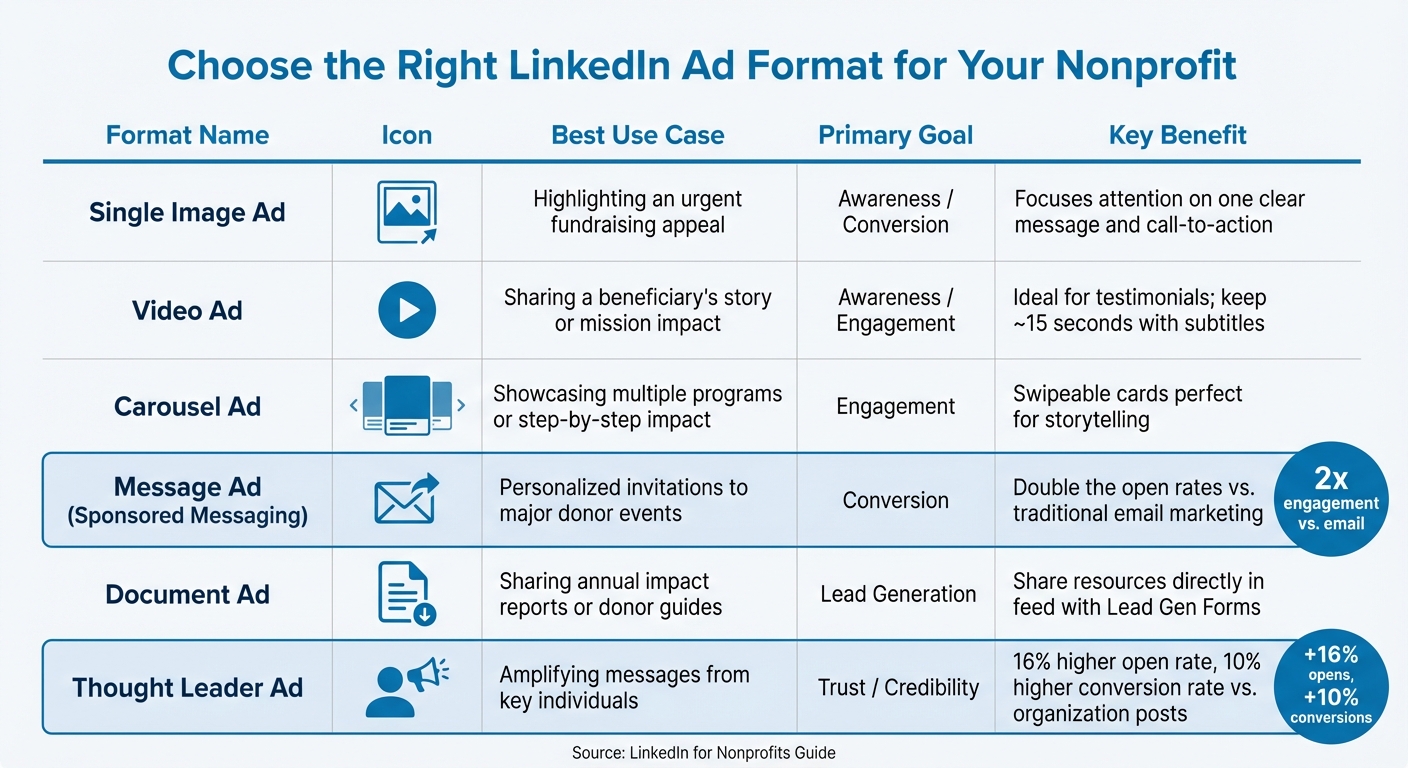
LinkedIn Ad Formats Comparison Guide for Nonprofits
Writing Mission-Focused Ad Copy
To grab attention and connect emotionally, focus on storytelling that highlights individual transformations. While statistics have their place, a story featuring one person’s journey often sparks more interest than a list of numbers. For faith-based nonprofits, this could mean showcasing a single life changed by your work instead of summarizing program outcomes. Keep your text concise - LinkedIn's "see more" button cuts off longer posts, and busy professionals tend to scroll quickly.
Use active verbs to make your impact clear and direct. For example, instead of saying, "Families are helped by our ministry", try, "Our ministry provides shelter to 50 families each month." This approach makes your work feel concrete and relatable. Focus on reaching those who are deeply aligned with your mission. As William Henry from Feathr puts it:
"It's better to find a smaller team of supporters that are sold on your mission rather than collecting a much larger group that isn't fully on board".
Create urgency by emphasizing specific deadlines, like matching gift campaigns or progress toward a funding goal. Swap out generic calls-to-action with more specific language - "Donate to provide clean water" is far more compelling than just "Donate". Tailor your message to the audience you're targeting, and ensure your visuals and text work together to convey a cohesive message. Once your copy is ready, choose an ad format that best fits your story.
Selecting the Right Ad Format
LinkedIn offers a variety of ad formats, each designed for different goals in donor engagement. Sponsored Content appears directly in users' news feeds, making it great for storytelling. Single Image Ads focus attention on one clear message and call-to-action, while Video Ads are ideal for sharing testimonials - keep them short (around 15 seconds) and include subtitles for accessibility. Carousel Ads, with their swipeable cards, are perfect for showcasing multiple programs or telling a step-by-step impact story.
For a more personal touch, Sponsored Messaging delivers updates directly to a prospect's inbox. These messages typically see double the open rates and engagement compared to traditional email marketing.
Document Ads are another option, allowing nonprofits to share resources like impact reports or donor guides directly in the feed. You can even use Lead Gen Forms to collect contact details seamlessly. Meanwhile, Thought Leader Ads sponsor posts from key individuals, like your executive director or board members, rather than your organization’s page. This strategy builds trust - messages sent from individuals on LinkedIn see a 16% higher open rate and 10% higher conversion rate compared to those from organizations.
| Ad Format | Best Use Case for Nonprofits | Primary Goal |
|---|---|---|
| Single Image | Highlighting an urgent fundraising appeal | Awareness / Conversion |
| Video | Sharing a beneficiary’s story or mission impact | Awareness / Engagement |
| Carousel | Showcasing multiple programs or step-by-step impact | Engagement |
| Message Ads | Personalized invitations to major donor events | Conversion |
| Document Ads | Sharing annual impact reports or donor guides | Lead Generation |
| Thought Leader | Amplifying messages from key individuals | Trust / Credibility |
Once you’ve selected the right ad format, the next step is to ensure your landing page converts visitors into donors.
Designing Landing Pages That Convert
Your landing page should deliver exactly what your ad promises. If your ad promotes a clean water initiative, the page should focus exclusively on that program - not your broader mission. Place your main call-to-action prominently above the fold, and make sure the design is mobile-friendly to cater to on-the-go users.
Use real photos from your work to reinforce the authenticity of your mission. As Leo Pedraza from LinkedIn for Nonprofits advises:
"Authentic imagery is the best way to bring your nonprofit's story to life".
Displaying your organization’s logo prominently is another way to establish credibility with LinkedIn’s professional audience - 52% of users have a college degree, and 54% earn over $100,000 annually.
Keep your donation form simple. Experiment with different lengths to strike a balance between gathering useful information and maintaining high conversion rates. If your website isn’t converting well, consider LinkedIn Lead Gen Forms, which pre-fill user data and keep them on the platform, reducing friction. Add UTM parameters to your landing page links to track which ads are driving the most donations. Finally, include social proof - quotes from beneficiaries or relevant statistics - to build trust and reinforce your message.
Launching and Improving Your Campaigns
Setting Budgets and Choosing Bid Strategies
To advertise on LinkedIn, you'll need a minimum daily budget of $10 or a lifetime budget of at least $100. For new campaigns, LinkedIn suggests starting with $25 per day, while more seasoned advertisers might aim for $50–$100 daily. If you're looking to optimize spending for conversions, automated bidding, referred to as "Maximum Delivery", is a solid choice.
Budgets can be set for individual campaigns or managed across multiple campaigns using a Dynamic Group Budget. This feature automatically allocates funds to the best-performing campaigns, saving you from constant manual adjustments and helping you get the most out of your investment. For example, if you're working on a seasonal fundraising effort with a strict spending limit, a lifetime budget with fixed start and end dates is the way to go. For ongoing donor outreach, however, a daily budget ensures consistent visibility.
To gather meaningful performance data, let your campaigns run for at least seven consecutive days before making any significant changes.
Tracking Performance Metrics
When tracking your campaign's success, focus on metrics that directly tie to donor acquisition rather than superficial numbers. The click-through rate (CTR) is a key indicator of how well your ad resonates with its audience. A strong CTR can even improve your standing in LinkedIn's auction system. As Tequia Burt, former Editor in Chief at LinkedIn, notes:
"If your ads historically have a higher CTR, you get a boost; that means you can win an auction without being the highest bidder".
Other critical metrics include cost per lead (CPL) and cost per conversion, which help measure how efficiently you're acquiring donors. If you notice a rising CPL, it might be time to fine-tune your targeting or improve your landing pages. LinkedIn's Campaign Manager also provides detailed performance insights based on professional demographics, helping you identify which job functions or seniority levels are most engaged with your campaign.
| Funnel Stage | Key Metrics | What They Tell You |
|---|---|---|
| Awareness | Impressions, Clicks, CTR | Whether your ad is reaching and engaging the right audience |
| Consideration | Website Traffic, Time on Site | If your message encourages deeper engagement |
| Conversion | Conversions, Conversion Rate, CPL | How well you're turning interest into donations |
Armed with these insights, you can refine your strategies to better connect with potential donors.
Testing and Optimizing Your Campaigns
Begin with a broad audience of around 50,000 members to collect enough data, and then narrow your targeting based on who responds most effectively. Create four ad variations, each with different images, headlines, or calls-to-action, to identify which combination generates the best results.
When testing, focus on one element at a time. For instance, if you change both the job function filter and the ad image simultaneously, it will be difficult to determine which adjustment led to better performance. Alexandra Rynne, Content Strategy Lead at LinkedIn Ads, offers this advice:
"If something's not working for you, cut it. There's always another campaign, and you can always try tweaking messaging as you go".
To speed up the optimization process, allocate a larger initial budget for quicker data collection. Once you've identified a top-performing ad, continue testing it against new variations to further improve results. Focus on bottom-funnel metrics, like cost per conversion, rather than just clicks or impressions - after all, the ultimate goal is to acquire donors.
Measuring ROI and Scaling Your Campaigns
Calculating Cost Per Donor and ROI
To calculate Donor Acquisition Cost (DAC), divide your total ad spend by the number of new donors acquired. For example, spending $2,500 to acquire 25 donors results in a DAC of $100. Compare this figure to the Donor Lifetime Value (LTV), which is determined by multiplying the average donor lifespan by their average donation amount and donation frequency. As highlighted in the Fundraising Report Card:
"Business model failure comes when DAC exceeds LTV".
The success of your fundraising efforts hinges on ensuring that the long-term value a donor brings significantly surpasses the cost of acquiring them. Break down your DAC by donor type to fine-tune your campaigns. For instance, acquiring major donors might be more expensive, but they often deliver much higher LTV. On the other hand, annual fund donors may cost less to acquire but generally contribute less over time. These calculations help identify which ads yield the best results.
Finding What Works Best
Pinpoint your most effective ads by analyzing conversion rates and cost metrics. Dive into donor demographics such as job titles, industries, and seniority levels to refine your targeting. Well-optimized campaigns can succeed in auctions without requiring the highest bids.
Use your initial campaigns to establish a performance baseline, which will help you measure growth accurately. Once you’ve identified which ads perform best, shift your budget away from underperforming ads and allocate more to those delivering strong results. Save your most effective audience filters as templates to simplify the process of replicating success in future campaigns.
Expanding Successful Campaigns
When you’ve identified what works, scale your campaigns while keeping costs manageable. LinkedIn’s Audience Expansion feature can help you automatically reach new members who share similar characteristics with your top-performing segments. Additionally, uploading your donor lists allows you to create Lookalike Audiences, which target users with professional traits similar to those of your current supporters.
As you increase your budget, keep an eye on Frequency to prevent audience fatigue. When testing new variations, start with a broad audience of about 50,000 members, then narrow your targeting based on engagement data. This approach ensures you maintain momentum while exploring untapped opportunities.
Conclusion and Next Steps
LinkedIn Ads offer faith-based nonprofits a powerful way to connect with professional donors who share their mission. By focusing on clear objectives, leveraging precise targeting for specific industries and job titles, and choosing the most effective ad formats - like Sponsored Content, Sponsored Messaging, or Lead Gen Forms - you can create campaigns that deliver real results. With access to over 774 million professionals and engagement rates twice as high as traditional email marketing, LinkedIn is a valuable tool for donor acquisition.
To get started, build on the targeting and setup strategies outlined earlier. Link your organization’s LinkedIn page and launch a pilot campaign to test your messaging. Start with a target audience of about 50,000 members to collect meaningful performance data, and adjust your targeting filters based on the results.
Having clear goals is essential for success. As Leo Pedraza, Marketing, Comms, and Brand Manager at LinkedIn for Nonprofits, explains:
"The best ad campaigns are ones that have a clear goal. That's why the first step in creating your campaign on LinkedIn is determining your objective: awareness, consideration, or conversions."
To fine-tune your strategy, monitor key metrics like Click-Through Rate (CTR), Conversion Rate, and Return on Ad Spend (ROAS) to identify your top-performing ads. Use A/B testing to experiment with visuals and copy, and reallocate your budget to campaigns that deliver the best results.
If managing LinkedIn Ads feels like a challenge or you want to ensure success from the start, Share Services offers expert campaign management tailored specifically for nonprofits with revenues between $1M–$20M. Their team takes care of everything - from strategic setup and audience targeting to creative optimization and performance tracking - helping your organization reach the right professionals and turn them into dedicated supporters.
FAQs
How can LinkedIn Ads help faith-based nonprofits attract new donors?
LinkedIn Ads offer faith-based nonprofits a way to connect with professionals across the U.S. who not only have the financial means but also share an interest in charitable giving. With LinkedIn's advanced targeting options, you can zero in on potential donors by job title, industry, seniority, location, and even interests like faith-based philanthropy. This level of precision ensures your message reaches the right people.
Beyond targeting, LinkedIn Ads help establish your nonprofit as a trusted voice in its field. Using ad formats like carousel ads, videos, or single-image ads, you can share meaningful stories that strike a chord with your audience. Plus, LinkedIn’s analytics tools let you monitor important metrics, such as clicks and conversions, so you can clearly measure your return on investment (ROI).
To make the most of LinkedIn Ads, it’s essential to start with a clear donor strategy. Tools like Sales Navigator can refine your outreach, while Share Services can assist with crafting impactful ad campaigns, fine-tuning your targeting, and optimizing performance. These efforts can help your nonprofit grow its donor base and drive its mission forward.
What targeting options can I use to create effective LinkedIn ad campaigns?
To run successful LinkedIn ad campaigns, the first step is to clearly define your audience using LinkedIn’s powerful targeting options. You can narrow your reach by location - whether that’s a specific country, state, or city - and refine it further with audience attributes like company name, industry, company size, job title, seniority level, job function, years of experience, education level, or demographic details such as age and gender.
LinkedIn also offers targeting based on interests and traits, including professional groups, skills, and LinkedIn-derived interests. For even more precise targeting, you can tap into custom audiences, such as email lists, website visitors, or account-based lists. If you’re looking to expand your reach, LinkedIn’s predictive audiences can help you connect with users who resemble your most engaged supporters.
When it comes to setting up your campaign, you have two options: Classic ad sets and Auto-Targeting ad sets. Classic ad sets let you manually define every aspect of your audience, giving you complete control. On the other hand, Auto-Targeting uses LinkedIn’s AI to generate an audience based on your inputs, making the process quicker and easier. Both approaches have their benefits, so the choice depends on your campaign goals and how much control you want over the targeting process.
How can faith-based nonprofits evaluate the effectiveness of their LinkedIn Ads for attracting new donors?
Faith-based nonprofits can gauge the effectiveness of their LinkedIn Ads by keeping an eye on key metrics in LinkedIn Campaign Manager. Pay attention to impressions, clicks, click-through rates (CTR), conversions (like new donor sign-ups or donations), cost per acquisition (CPA), and overall return on investment (ROI).
These metrics shed light on how well your ads are connecting with and engaging potential donors. By analyzing this data, you can fine-tune your campaigns to achieve stronger results. Consistently reviewing and adjusting your strategy based on these insights helps ensure your donor outreach stays impactful and aligned with your mission.
Related Blog Posts
Get helpful resources, straight to your inbox
We love sharing tools, ideas, and stories that make nonprofit work a little lighter and a lot more effective. Sign up below and we’ll send you practical tips, free resources, and a bit of encouragement—because the work you’re doing matters.
No spam. Just good stuff for good people.