

Feb 16, 2026
Improving Email Metrics: Common Problems and Fixes
Every email you send is a chance to connect with your audience, but low open rates, poor click-through rates (CTR), high bounce rates, and unsubscribes can hurt your efforts. Here's how to fix these issues:
- Low Open Rates: Improve subject lines, send emails at optimal times, and clean your list regularly.
- Low CTR: Use clear, action-driven calls-to-action (CTAs), segment your audience, and optimize for mobile.
- High Bounce Rates: Remove invalid addresses, use double opt-ins, and validate emails before campaigns.
- Unsubscribes: Let users manage preferences, avoid overwhelming them with emails, and focus on relevant content.
- Turning Engagement into Donations: Use specific CTAs, simplify donation pages, and align email content with landing pages.
Tracking performance (CTOR, CTR, list growth) and A/B testing are key to ongoing improvements. Tools like SPF, DKIM, and DMARC ensure your emails land in inboxes, not spam folders. By refining your approach, you can build stronger connections and drive more results through email campaigns.
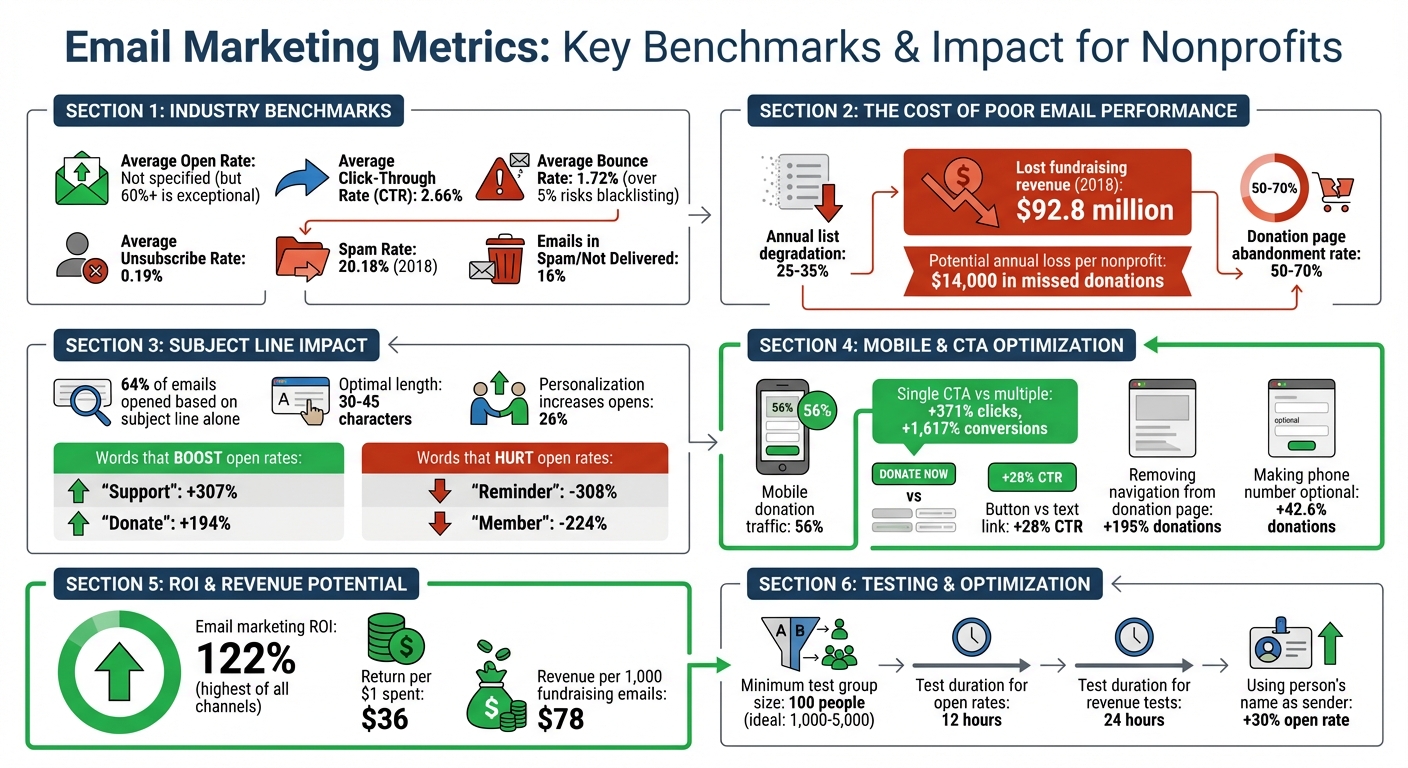
Email Marketing Metrics and Benchmarks for Nonprofits
Fixing Low Open Rates
Why Open Rates Are Low
Subject lines are your email's first impression, and they matter - a lot. Generic phrases like "Newsletter" or "Update" often fail to grab attention. In fact, certain words can actively hurt your open rates; for example, using "Reminder" can decrease open rates by 308%, and "Member" can lower them by 224%. With 64% of nonprofit emails opened based solely on subject lines, this is a critical area to get right.
Timing is another key factor. Emails sent when your audience is asleep, in meetings, or overwhelmed by other messages are likely to get buried. On top of that, striking the right frequency is tricky: too many emails can lead to list fatigue, while too few might make donors forget your organization altogether. Poor list hygiene, such as continuing to email inactive subscribers, can also drag down engagement.
Technical issues play a role as well. Without proper email authentication - like SPF, DKIM, and DMARC records - your messages might not even make it to the inbox. Add to that an unrecognizable sender name, such as "info@" or "noreply@", and recipients might hesitate to open your emails. Alarmingly, up to 12% of nonprofit emails end up in spam folders, potentially costing organizations around $14,000 annually in missed donations.
How to Increase Open Rates
Start by cleaning up your email list. Removing subscribers who haven’t engaged in six months can improve your sender reputation and, in turn, your open rates. A/B testing subject lines is another powerful tactic. For example, Cornerstone Magazine saw open rates soar above 60% - more than double the nonprofit average - by consistently testing subject lines and tailoring their content to their audience.
When crafting subject lines, aim for brevity. Keep them between 30–45 characters to ensure they display properly on mobile devices. Personalization is also key - it can make recipients 26% more likely to open your email. Action verbs can make a big difference too. Words like "Support" can boost open rates by 307%, while "Donate" increases them by 194%.
Timing matters just as much as the message. Emails sent mid-week - Tuesday through Thursday - tend to perform better. For even better results, consider using tools that send emails at the exact times your recipients are most likely to check their inboxes. On the technical side, make sure your domain is authenticated with SPF, DKIM, and DMARC records to improve deliverability. And don’t underestimate the power of a friendly, recognizable sender name. Something like "Sarah at [Your Organization]" is far more engaging than a generic address like "noreply@".
Organizations like Share Services specialize in helping nonprofits develop email strategies that tackle these challenges head-on. From refining subject lines and segmenting lists to optimizing technical setups and tracking performance, they ensure your emails land in front of supporters when they’re most likely to engage.
These adjustments to subject lines, timing, and technical details are essential steps in improving email performance and building stronger connections with your audience.
sbb-itb-deea482
Lowering High Bounce Rates
Hard Bounces vs. Soft Bounces
Hard and soft bounces affect email deliverability in distinct ways. Hard bounces are permanent failures - think invalid email addresses, non-existent domains, or recipients actively blocking your emails. These addresses should be removed immediately to protect your sender reputation. On the other hand, soft bounces are temporary issues, such as a full inbox, server outages, or messages that exceed size limits. If an email address soft bounces three to five times in a row, it’s best to remove it to avoid further delivery issues. Keep in mind, the average bounce rate for nonprofits is 1.72%, and anything over 5% could lead to blacklisting. Staying on top of your email list is key to managing these challenges.
Maintaining a Clean Email List
Email lists naturally degrade by 25%–35% each year. Without regular upkeep, this decline can hurt both your deliverability and your relationship with donors.
One effective strategy is implementing a double opt-in process for new subscribers. This requires users to confirm their email address, reducing errors and fake sign-ups. Additionally, review and clean your list every three to six months. Remove hard bounces right away, and use email verification tools before major campaigns to validate your contacts in bulk.
Consider the example of the Centennial Institute. In March 2014, they took a bold step by cutting their email list by 78%, removing hard bounces and inactive subscribers. John Andrews, the director, had a list of 45,000 contacts that suffered from an 18% bounce rate. After the cleanup, their open rates soared by 225% (from 12% to 39%), click-through rates improved by 117%, and their bounce rate plummeted to just 0.62%.
"I've got to say, that was like cutting off my arm".
This shows that regular email list maintenance doesn’t just reduce bounces - it also boosts the overall performance of your campaigns.
Increasing Click-Through Rates (CTR)
What Causes Low CTR
Once you've improved open rates, the next hurdle is turning those opens into clicks. For nonprofits, the average email click-through rate sits at just 2.66%, and several issues contribute to this challenge. One major factor is irrelevant content - sending the same generic message to everyone on your list rarely connects with supporters. Think about it: a donor who gave $500 last month likely has different priorities than someone who just signed up for your newsletter and hasn't donated yet.
Another culprit? Weak calls-to-action (CTAs). Vague or uninspiring CTAs, or ones buried too far down in the email, are often ignored. Considering most readers spend less than 10 seconds on an email, grabbing their attention right away is critical. Mobile incompatibility is another major barrier - since 56% of donation page traffic comes from mobile devices, an email that's hard to navigate on a smartphone could cost you more than half your potential clicks. Lastly, information overload can overwhelm readers. Bombarding them with too many CTAs - like "read more", "volunteer", and "donate" all in the same email - often leads to decision paralysis, reducing the chances of any action being taken.
How to Improve CTR
Start by segmenting your email list based on engagement levels. Tailor your content for active supporters, occasional donors, and those who've been inactive for 90–180 days. This approach not only boosts CTRs but also strengthens your campaign's overall impact.
Refine your CTA placement and language for better results. Place your primary CTA "above the fold", so it’s visible without scrolling, and repeat it in a P.S. section at the end. Swap out generic phrases for specific, action-driven language. For example, Sheltered Paws, an animal rescue organization, replaced "Donate Today" with "Feed a Sheltered Pup for a Week" and saw a 47% increase in clicks. Similarly, Books for All changed "Give the Gift of Reading" to "Gift a Book Kit to a Classroom", leading to a 35% boost in donations.
"A campaign email is not a teaching opportunity. That's what e-newsletters are for. Figure out what one thing you want the reader to do, and don't offer the opportunity to do anything else." - Claire Axelrad, J.D., CFRE, Fundraising Coach
Experiment with different formats to see what resonates. For instance, adding video can increase CTRs by 200% to 300%. Use A/B testing to refine variables like button color, CTA wording, or even the time of day you send emails - 10 a.m. to 2 p.m. often performs best. And don’t underestimate the importance of mobile optimization. Responsive layouts, legible fonts, and clickable buttons make it easier for readers to take action, especially on smaller screens.
Share Services specializes in helping nonprofits craft engaging email campaigns that inspire action and strengthen connections with supporters. By fine-tuning CTA placement, testing content, and ensuring mobile-friendly designs, you can take your email engagement to the next level.
Reducing Unsubscribe and Spam Complaint Rates
Why People Unsubscribe or Mark as Spam
After putting in the effort to increase clicks, losing subscribers can feel like a major setback. Yet, the average nonprofit faces an unsubscribe rate of 0.19%, while about 16% of nonprofit emails either end up in spam folders or fail to reach inboxes altogether. In 2018 alone, nonprofits lost $92.8 million in online fundraising revenue due to email deliverability issues. Even more concerning, the spam rate surged from 7% in 2015 to 20.18% by 2018.
Why does this happen? Sending too many emails can overwhelm supporters, leading to inbox fatigue. Content that feels irrelevant - like constant donation requests without sharing meaningful impact stories - can also drive people to unsubscribe. On top of that, emailing individuals who never opted in can lead to complaints and even regulatory trouble. Technical missteps, such as leaving out a physical address, hiding the unsubscribe link, or using spam-trigger words like "Free", "Winner", or "Urgent", can push your emails straight into spam folders.
"Mailbox providers like Gmail use hundreds of signals to determine whether an email is spam - including user behavior, domain reputation, and authentication protocols like SPF, DKIM, and DMARC." - Litmus
How to Keep Subscribers
Keeping your subscribers happy goes beyond getting them to open or click on your emails. It’s about keeping them engaged and giving them control. For example, adding a "Manage Preferences" link near the unsubscribe button lets recipients adjust how often they hear from you - perhaps switching from weekly updates to monthly ones - rather than unsubscribing entirely. Using double opt-in for new subscribers also ensures your list is filled with people who genuinely want to hear from you. Keep in mind that email lists naturally shrink by about 22.5% every year, so regularly cleaning your database is a must.
For subscribers who’ve gone quiet, consider launching a winback campaign. A series of 3–5 automated emails can re-engage those who haven’t interacted in six months or more, giving them a chance to reconnect - or opt out. Segmenting your list by engagement level - like recent donors, occasional supporters, and inactive contacts - allows you to send tailored content that aligns with each group’s interests. And always stick to explicit opt-ins; buying or selling email lists is a fast track to high spam complaints.
Technical compliance also plays a big role in retaining subscribers. Use SPF, DKIM, and DMARC authentication to verify your identity as a sender and reduce the chances of your emails being flagged as spam. Providers like Gmail and Yahoo expect complaint rates to stay under 0.3%, so monitoring your domain reputation with tools like SenderScore.org is crucial. To avoid triggering spam filters, aim for a 60/40 text-to-image ratio and steer clear of overly promotional language in your subject lines. Don’t forget to include a physical mailing address in your footer - it’s not just a legal requirement but also a way to build trust with your audience.
Organizations like Share Services specialize in helping nonprofits maintain clean email lists and strong sender reputations. By combining strategies like segmentation, preference management, and technical fine-tuning, you can strike the right balance between email frequency and relevance. This keeps your subscribers engaged and ensures they stick around for the long term.
Converting Email Readers into Donors
Why Email Engagement Doesn't Lead to Donations
Getting people to open and click your emails is just the beginning. The real challenge lies in turning that interaction into actual donations. Unfortunately, many email campaigns fall short at this critical step. Abandonment rates for donation pages hover between 50–70%, often because the donation request is unclear or fails to specify what the contribution will achieve. Without a sense of urgency or a strong call-to-action, potential donors may simply decide to delay - or skip - giving altogether.
Things can get even worse when donors land on a poorly designed donation page. If the page loads slowly, demands too much personal information, or doesn’t align with the email’s messaging, donors are more likely to abandon the process. For example, requiring a phone number can lead to a 42.6% drop in donations. Similarly, if the landing page features a generic mission statement instead of reinforcing the specific need described in the email, donors may feel disconnected and leave without completing their gift. These common missteps highlight the importance of crafting emails - and donation pages - that work together to convert engagement into action.
Making Emails That Drive Donations
Once you've nailed open and click rates, the next step is ensuring your emails lead to actual donations. The key? A clear and specific call-to-action. Vague phrases like "Support Our Work" don’t inspire action. Instead, try something specific and tangible, like "Donate $20 to provide school supplies for a child". Emails with a single, focused call-to-action see a massive boost in performance - 371% more clicks and 1,617% higher conversions. Avoid overwhelming readers with multiple requests. Stick to one ask, and use a button link rather than a text link. Buttons can increase click-through rates by 28%, especially when they’re designed with high-contrast colors like red or orange. Place the button above the fold so mobile users see it immediately.
"An email without an effective CTA is like a ship without a rudder. Sure, it might float, but it won't necessarily go where you want it to." - Jeremy Reis
Once a supporter clicks through, the donation page must deliver on the email’s promise. For example, removing navigation links from the header can increase donations by 195% [51, 53]. A single-step form can also prevent a 52% drop in conversions. To make giving feel accessible, list donation amounts from low to high - this way, smaller amounts seem achievable, while larger amounts feel aspirational [52, 53]. Other small changes, like making the phone number field optional, pre-filling the donor’s name and email, or adding a padlock icon near payment fields, can build trust and boost conversions by 20%.
For nonprofits aiming to go beyond email, Share Services offers paid media campaigns and multi-channel strategies to attract and convert new donors. By combining strong email calls-to-action with broader digital marketing efforts, you can reach more supporters and turn email engagement into meaningful contributions. Optimized donation pages are the final piece of the puzzle, ensuring that all your hard work pays off with real, tangible support.
Tracking and Improving Email Performance Over Time
Regular Performance Reviews and Adjustments
Keeping a close eye on email metrics can help you understand donor behavior and catch potential issues early. Conducting monthly or quarterly reviews allows you to identify trends and address problems before they grow. Since your nonprofit's email strategy - like sending frequency, audience segmentation, and content style - is unique, comparing your performance solely to industry averages might not provide the clearest picture. Instead, establish your own baselines.
Pay attention to key metrics like CTOR (click-to-open rate), conversion rate, and list growth. These metrics provide insight into what’s working and what isn’t. For example, CTOR is a better gauge of engagement than open rates, especially with recent privacy changes affecting open data reliability. Conversion rates measure how well your emails drive actions, such as donations or sign-ups. Meanwhile, list growth rate indicates whether you're bringing in new supporters faster than you're losing them. These insights can guide you toward more targeted testing and strategy adjustments.
Using A/B Testing and Automation
A/B testing helps you make informed decisions by replacing guesswork with data. For example, if you’re unsure whether a different subject line or call-to-action would work better, test it. To do this, change one variable at a time and send two versions to randomized groups. Once you’ve gathered enough data, go with the version that performs best. Allow about 12 hours for open rate tests and 24 hours for revenue-related tests.
"A/B testing is a tool you can use to create the best version of your email, based on data instead of hunches." - Megan Donahue, Writer, Virtuous Software
Email marketing boasts a 122% return on investment, outperforming social media, direct mail, or paid search by a wide margin. Tools like Constant Contact, Mailchimp, or Virtuous make the process easier, automatically identifying winning versions and rolling them out to your audience. You can test various elements, such as subject lines, sender names (using a person’s name can boost open rates by 30%), CTA button colors, and send times. For reliable results, ensure your test group includes at least 100 people - though 1,000 to 5,000 is ideal. This type of iterative testing helps you refine your approach over time.
Working with Share Services for Long-Term Results
Once you’ve established a system for tracking and testing, a long-term strategy will help you sustain and build on your success. Improving email metrics isn’t a one-time effort - it requires ongoing adjustments and a commitment to refining your approach. Share Services offers a Strategy Retainer that includes a dedicated nonprofit strategist, weekly strategy sessions, project management, KPI reporting, and a monthly project budget. These resources cover email marketing, branding, and conversion optimization for nonprofits with annual revenue between $1M and $20M.
For nonprofits looking to expand their outreach, Share Services also provides Paid Media Spend ($1,500/month) to manage campaigns on platforms like Meta, Google Ad Grants, and OTT. This multi-channel strategy helps you attract new donors while staying connected with your existing supporters. By combining customized strategies with consistent performance tracking, you can turn improved email engagement into long-term donor relationships.
Email Marketing 101 for Nonprofits: Best Practices to Boost Donor Engagement
Conclusion: Main Points for Better Email Metrics
Improving email metrics isn’t just about numbers - it’s about building stronger, lasting connections with your supporters. Every email you send should serve a purpose and leave an impact.
Start with deliverability. Even the most compelling content is useless if it doesn’t reach the inbox. Strengthen deliverability by verifying your domain, maintaining a clean email list, and steering clear of spam triggers. This ensures your messages have a fair chance to engage your audience.
Focus on click-based metrics like CTR (Click-Through Rate) and CTOR (Click-to-Open Rate). These offer a clearer picture of engagement, especially in light of recent privacy changes. Keep in mind, 64% of nonprofit emails are opened because of the subject line alone, so crafting a great subject line is key. On average, nonprofits raise $78 for every 1,000 fundraising emails sent. Personalization and segmentation can further enhance engagement, turning casual readers into active supporters.
Testing is your best friend. A/B test one element at a time - whether it’s the subject line, call-to-action placement, or send time. This approach helps you understand what appeals to your specific audience. Considering email marketing delivers an average of $36 for every $1 spent, even small improvements can lead to big results.
Treat your email list like a valuable asset, not just a number. A smaller, highly engaged list is far more effective than a large one filled with inactive contacts. With 60% of supporters feeling that nonprofit communications lack personalization, there’s a huge opportunity to stand out. Regularly clean your list, segment thoughtfully, and use clear calls-to-action to guide readers toward meaningful steps.
The key to success lies in constant refinement. Track performance, experiment with new ideas, and adjust based on what the data tells you. As Bonnie Beauchamp, Lead Systems Analyst at Atlanta Mission, explains:
"If we see a spike in engagement, we're going to dig into that, look at the data, and begin to prioritize what led to the increase to keep our story relevant to our constituents".
FAQs
What email metrics should I focus on if open rates are unreliable?
If open rates aren’t telling the full story, shift your attention to metrics that paint a better picture of supporter engagement. Click-to-open rates, click-through rates, and response or conversion rates offer a more accurate view of how people are engaging with your emails and connecting with your mission. These numbers reveal actual interaction rather than just email opens.
How often should we clean our nonprofit email list?
Nonprofits should tidy up their email lists every 3 to 6 months to keep things running smoothly and improve engagement. This means clearing out invalid addresses, inactive users, or contacts who aren’t engaging with your content. By doing this, you’ll ensure your emails land in the right inboxes and perform better overall.
What’s the fastest way to improve donation conversions from email?
The fastest way to increase donation conversions is by fine-tuning your email subject lines to boost open rates. If people don’t open your email, they won’t have a chance to engage or donate. Try experimenting with different subject lines to discover what grabs your audience’s attention - this small adjustment can lead to a noticeable rise in both engagement and contributions.
Related Blog Posts
Get helpful resources, straight to your inbox
We love sharing tools, ideas, and stories that make nonprofit work a little lighter and a lot more effective. Sign up below and we’ll send you practical tips, free resources, and a bit of encouragement—because the work you’re doing matters.
No spam. Just good stuff for good people.